New In-Play Experience
Redesigned the core GPS and shot tracking experience used by over 100,000 golfers every round, turning the #1 cancellation reason into the product's strongest feature.
The short version
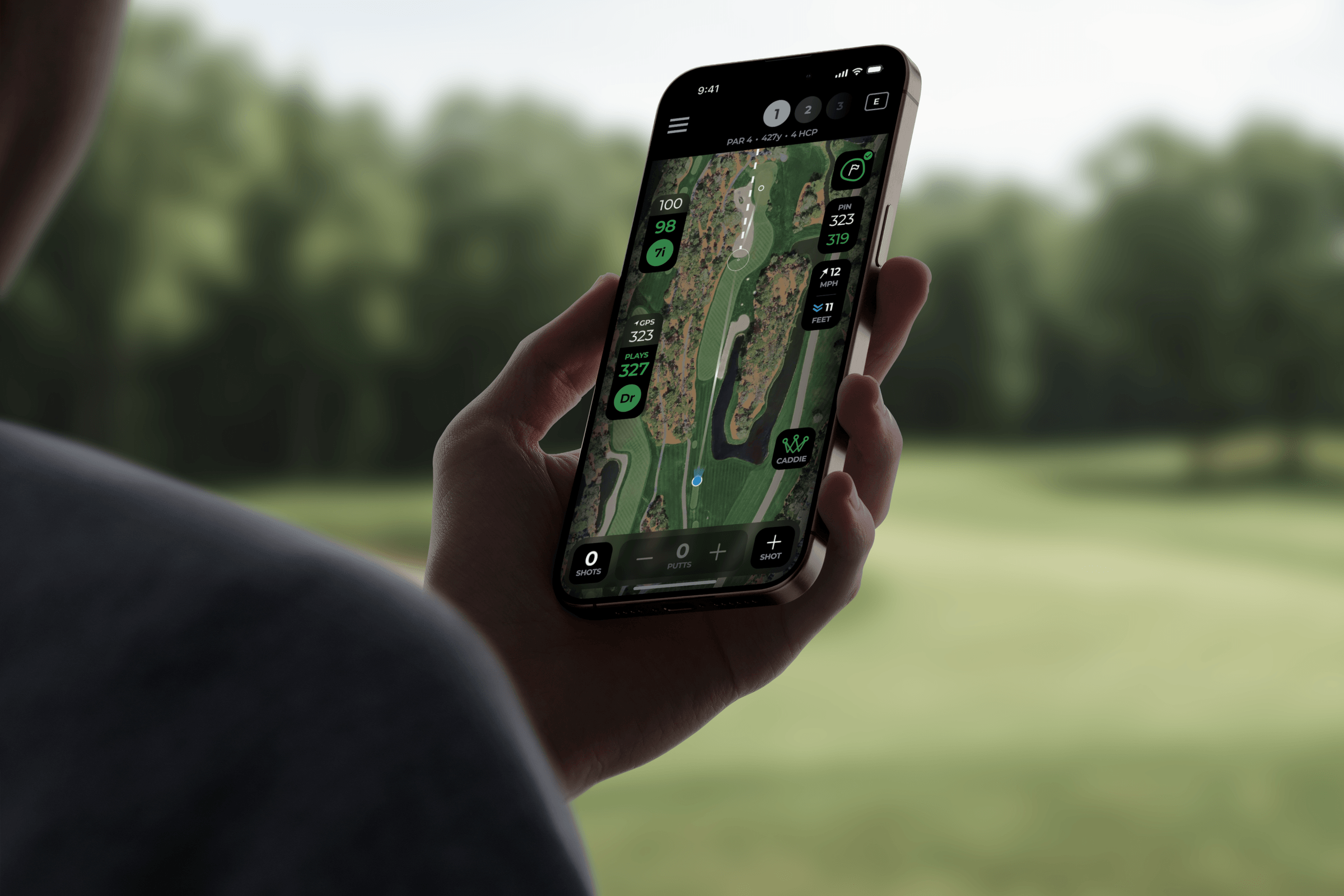
Arccos Golf had a retention problem. Users were canceling their subscriptions because the in-play experience, the thing they used every single round, was unreliable and painful to fix when it broke. This was the core experience of the app, and we replaced an eight-year-old interface with a map-first design that cut the number of taps to edit a shot in half. Catastrophic rounds (rounds so corrupted they were unusable) dropped by more than half. This update shipped as the largest in Arccos's history.
Read the official announcement →
What Arccos does
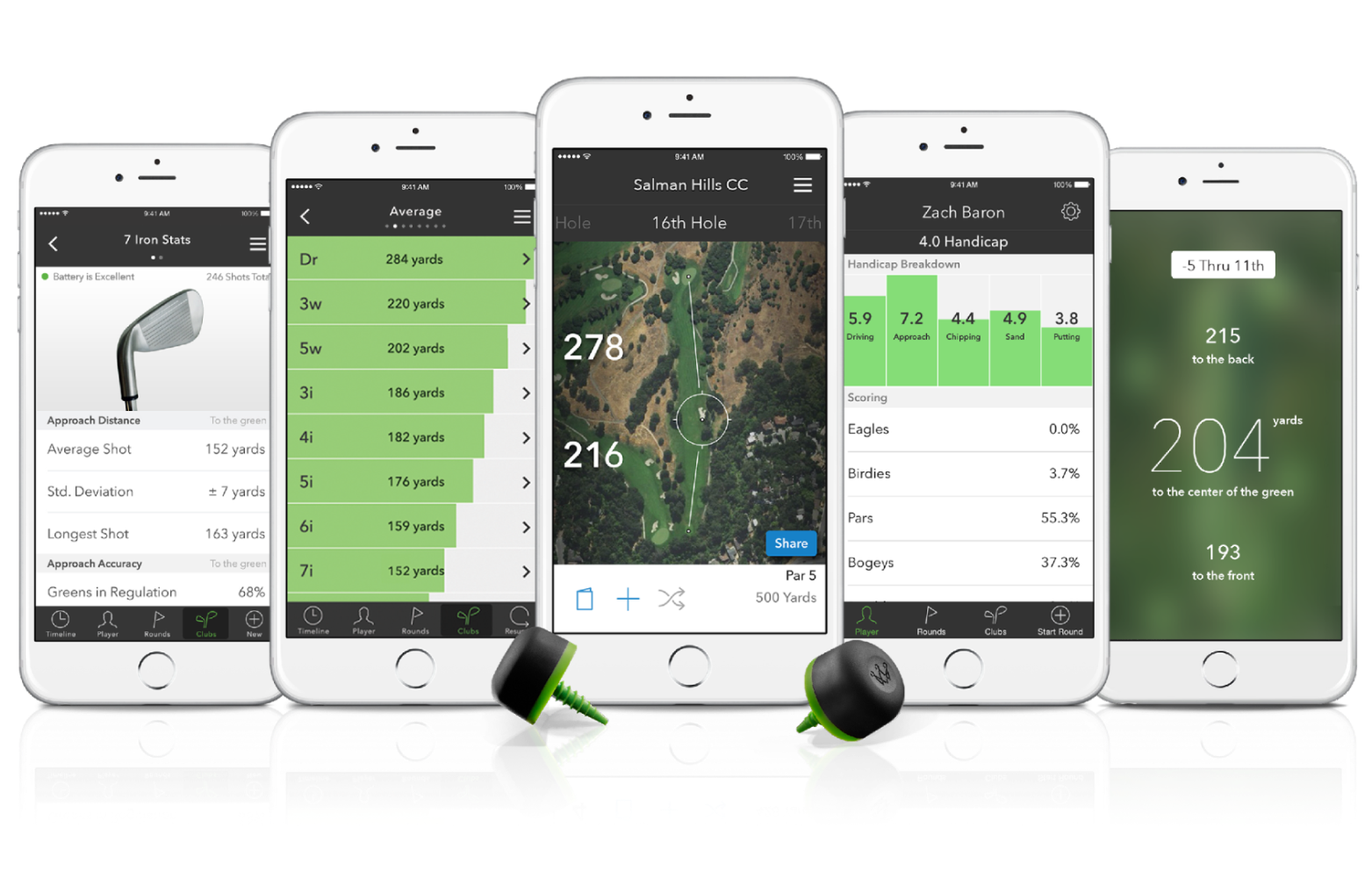
Arccos is golf's first automatic shot tracking platform. Smart sensors twist into each club grip, detect every swing, and sync to the app via phone, Apple Watch, or the Arccos Link wearable. That data powers Tour-level analytics and AI club recommendations, the kind of insight previously only available to professionals.
The product had strong early adoption and clear product-market fit. People wanted what Arccos was selling. But they weren't sticking around.
The problem
Two issues were compounding into a decline in retention.
Inconsistent shot detection. Sensors frequently triggered false positives or missed real shots. Bad data accumulated quickly, ruining the credibility of the analytics and recommendations users were paying for. Most users gave up and let the errors stand, which led straight to cancellation.
A broken editing experience. When detection failed, fixing it was painful. The editing UI was buried behind nested modals, required too many taps, and hadn't been updated in eight years. Rounds would get so corrupted that the data was useless. Internally we called these "catastrophic rounds," and they happened far too often.
The top cancellation reason said it all: "Problems with shot tracking."
Old UI:
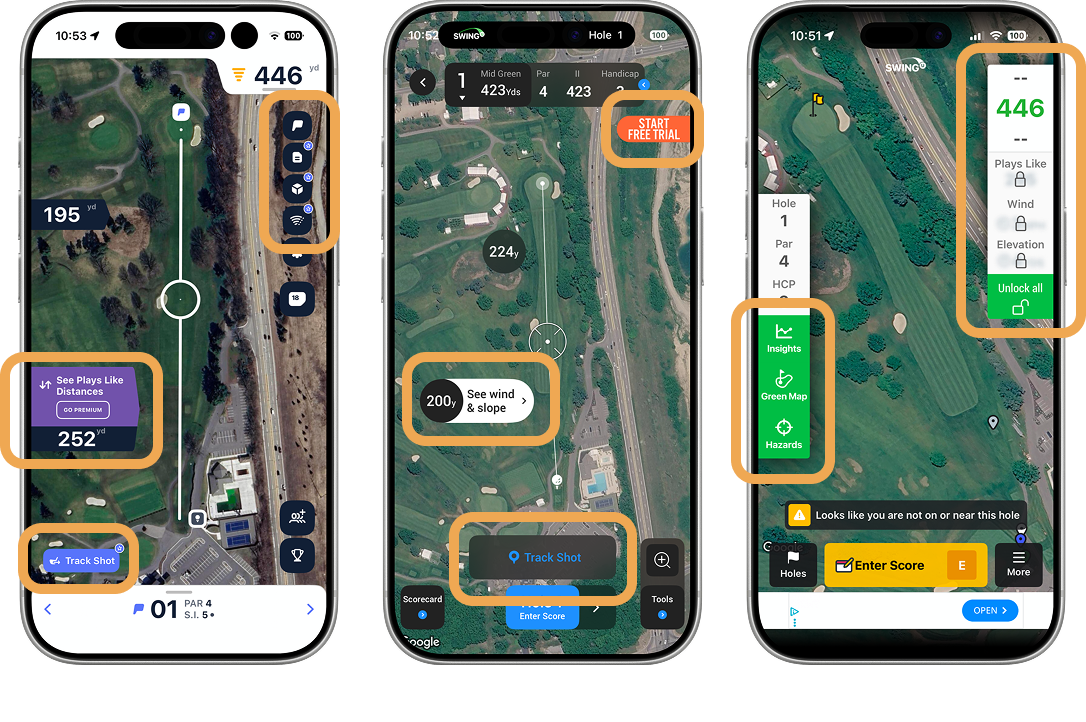
I audited every major competitor: Hole 19, 18Birdies, SwingU. All freemium, all cluttered with upsell prompts and banner ads (components circled in orange all led to upsells). Being a paid app, we had a huge opportunity to differentiate ourselves with a clean, premium, user-first UI.
Research
I ran two tracks of research before designing anything.
User interviews. 15-minute calls with a couple dozen members of our beta group. These were Arccos's most engaged users, people who played 3-4 times a week and genuinely wanted the product to succeed. My logic was: if these users were struggling, casual users didn't stand a chance.
Unmoderated testing. Async tests through Maze with a broader set of users, segmented by skill level and usage frequency. I wanted to see where people got stuck in the existing editing flow without the pressure of someone watching.
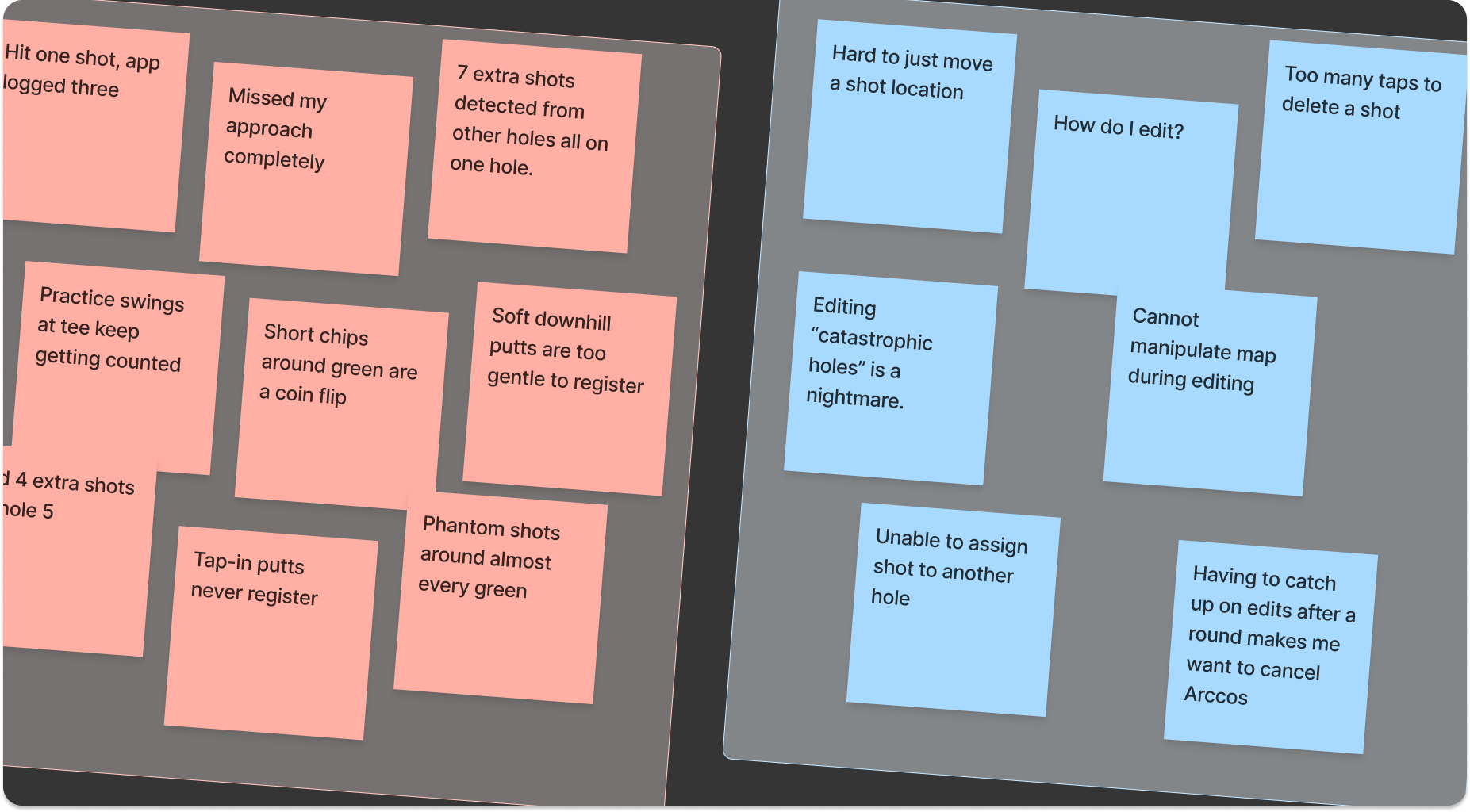
Resignation
Users described a pattern of trying to fix errors for the first few holes, then giving up by the back nine. The effort wasn't worth the interruption to their game.
"I hit one shot and it logged three. By the back nine I just stopped looking."
Avoidance
Rather than use the editing tools, most users chose to live with bad data.
"I'd rather just have the wrong data than spend my round fiddling with my phone."
Erosion
Each bad round eroded trust in the analytics. After 3-4 rounds with questionable data, users stopped believing the AI recommendations entirely, and that was the beginning of churn.
"I paid $200 for the sensors and I stopped using them after 3 rounds."
Design principles
Before opening Figma, I established four principles with the Head of Product and Director of Engineering. We printed them and kept them on the wall. When scope discussions got heated or a feature request came in, we pointed at the wall.
Map first, UI second
Maximize the satellite view. Chrome should disappear. All controls live in a bottom sheet that the user pulls up when they need it.
Fix it in 2 taps
Shot correction had to be radically simpler than the old nested-modal approach. We set a hard cap: two taps to complete any edit.
15 seconds or less
Every interaction had to pass a time-to-action test. Users are standing on a fairway with their group waiting. They don't have time to fiddle.
One thumb
Large touch targets, bottom-of-screen placement, usable with a golf glove on. No precision tapping, no small icons in corners.
Exploring directions
The central design question was straightforward: how do you maximize the map while still giving users fast access to shot data, editing, and scoring? I explored three approaches, each making a different tradeoff between screen real estate and information density.
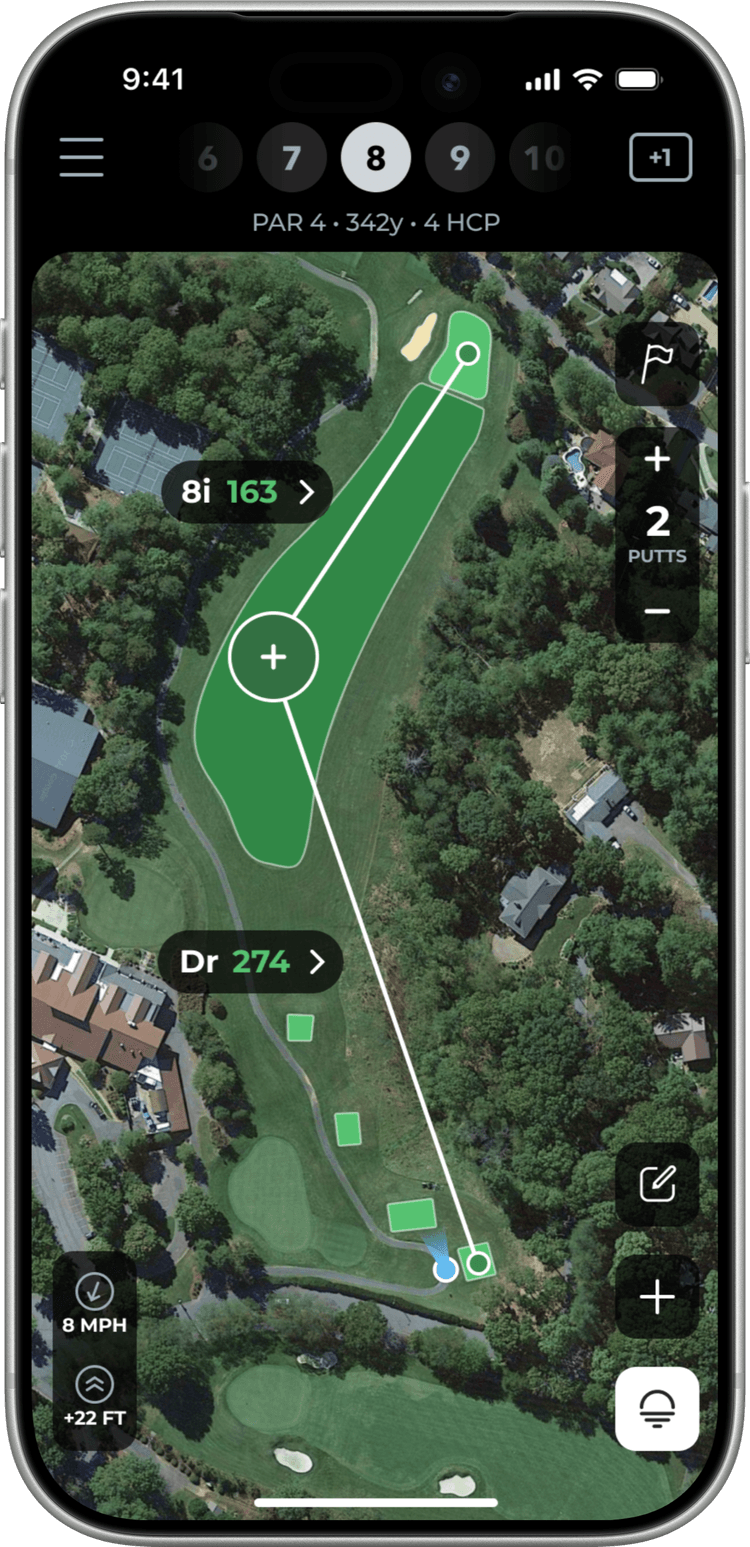
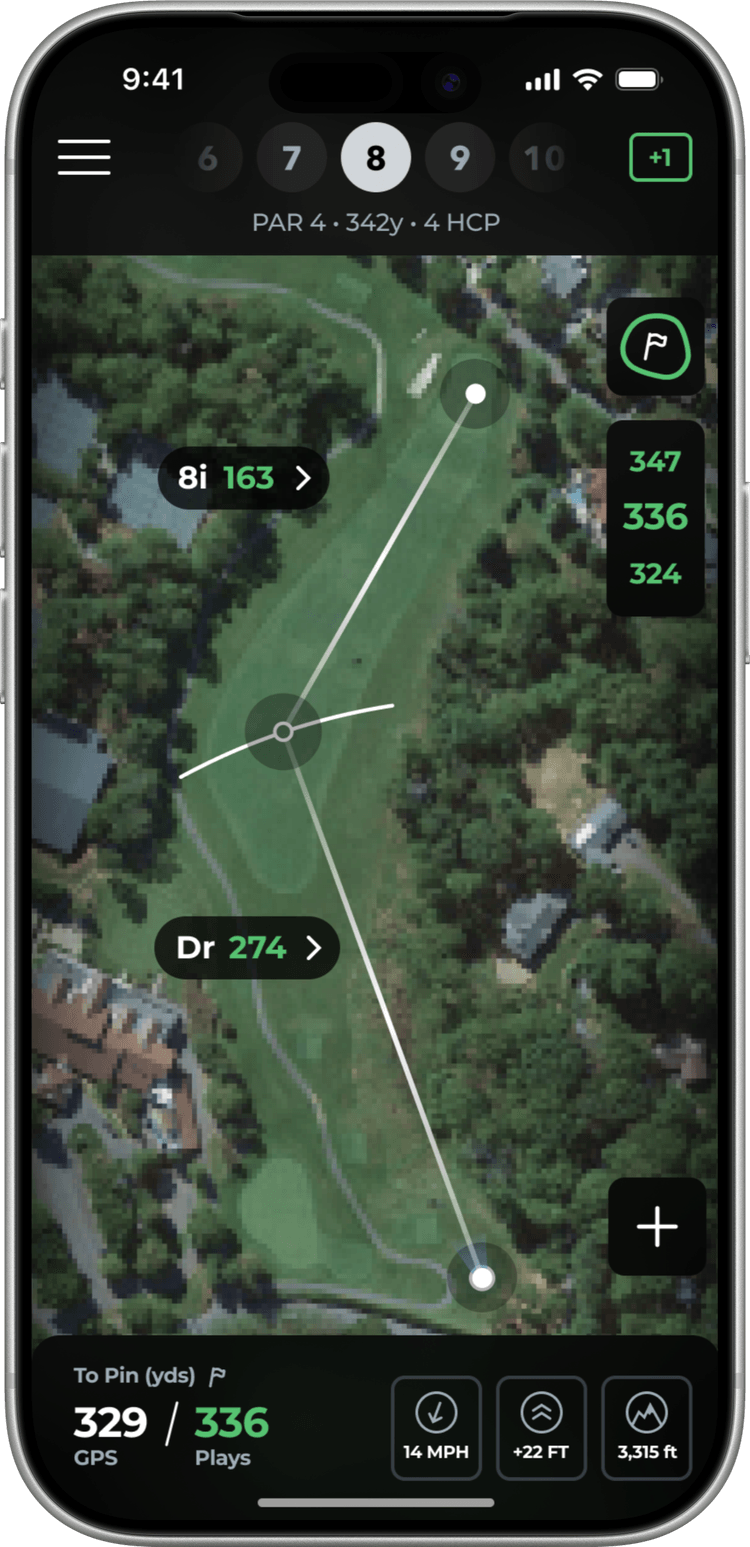
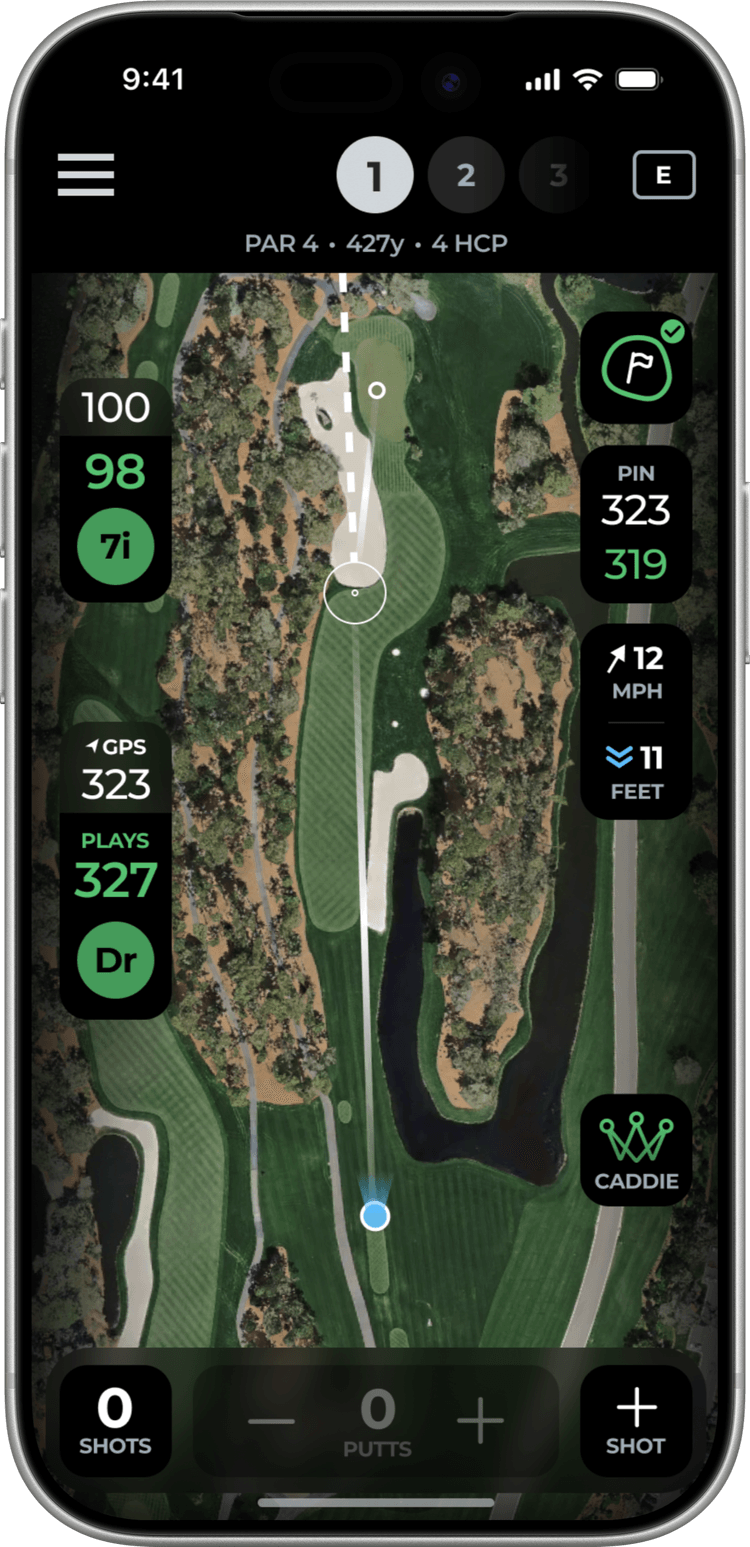
Tools button
Removed the bottom sheet entirely and replaced it with a single tools button. This gave the map maximum real estate, but testing revealed that users wanted key controls visible at all times, especially putt tracking. Burying everything behind a button added friction to the most common actions.
Collapsed sheet
A minimal bottom bar showing GPS and plays-as yardage with small pill markers for each shot. Cleaner than a full sheet, but users missed having a visible shot counter and quick putt controls. The pills were too abstract without supporting context.
Shot bar + grouped info
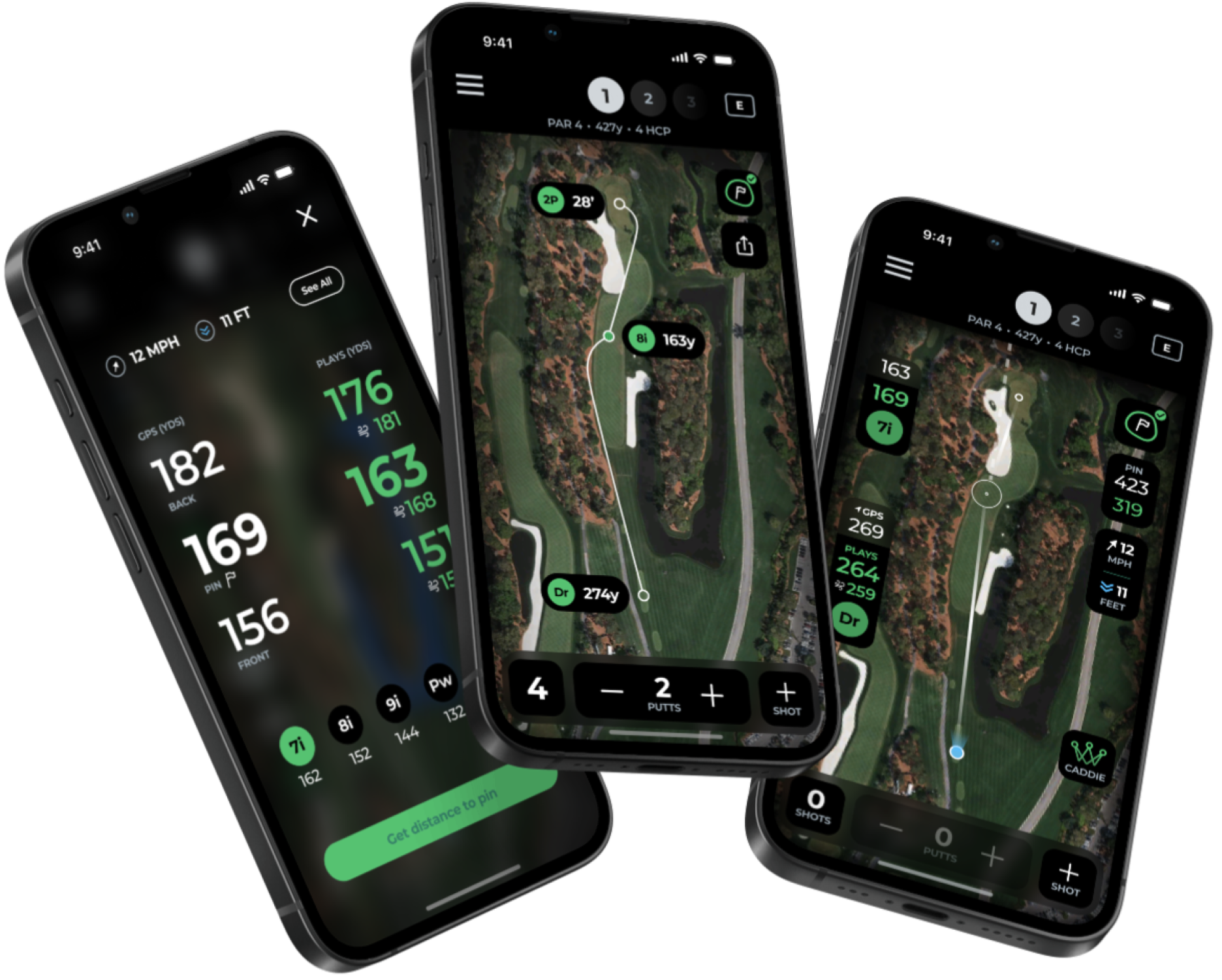
The winning direction. Pin distance sits directly beneath the flag icon. Wind and elevation are grouped in the top right. Each shot's data is clustered together on the left. A dedicated shot counter and putt increment controls sit at the bottom so users can adjust without opening a menu. A clear Caddie button provides an entry point for power users who want strategic overlays.
The final layout came directly from feedback. Users wanted to glance at their phone and immediately know three things: how far to the pin, how many shots they'd taken, and how many putts to log. Grouping related information by location on the screen made that possible without adding clutter.
The new in-play screen
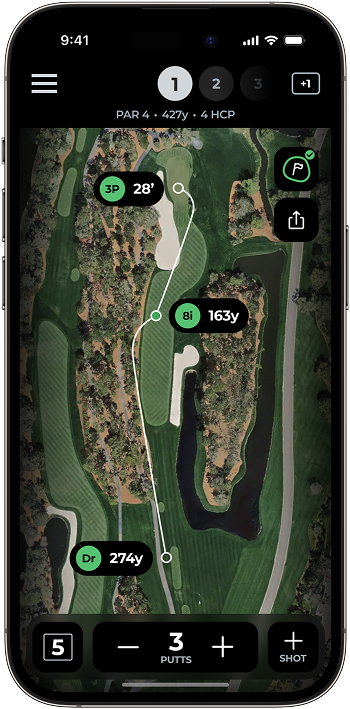
The final design layers three systems over a full-screen satellite map: a Navigator at the top for hole-by-hole swiping, a Contextual Sheet at the bottom that adapts to your position on the course, and Action Buttons along the edges for the tools you need most often.
The map is the primary interface. Everything else is secondary to the satellite view of the hole you're playing.

Contextual sheets
Moving actions into contextual bottom sheets was one of the key architectural decisions. Rather than stacking modals or navigating to separate screens, every action lives on one adaptive surface. The user never leaves the map.
Shot editing
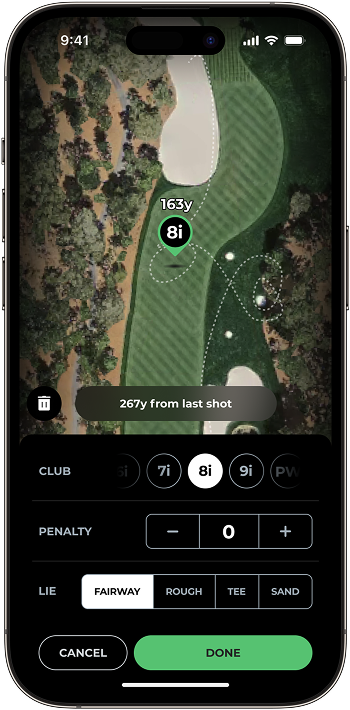
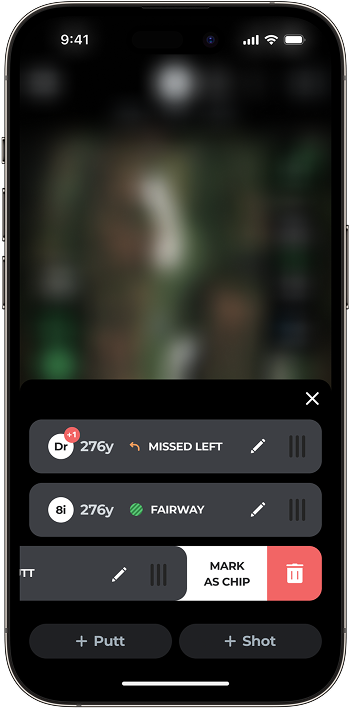
Adding a shot: tap the + button, tap the map. No menus, no confirmation dialogs, no modes. The shot appears where you tapped.
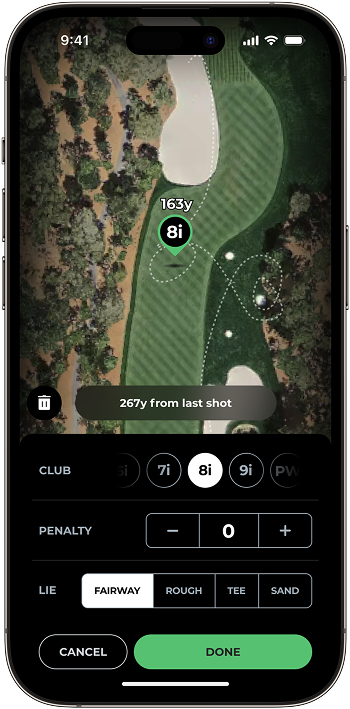
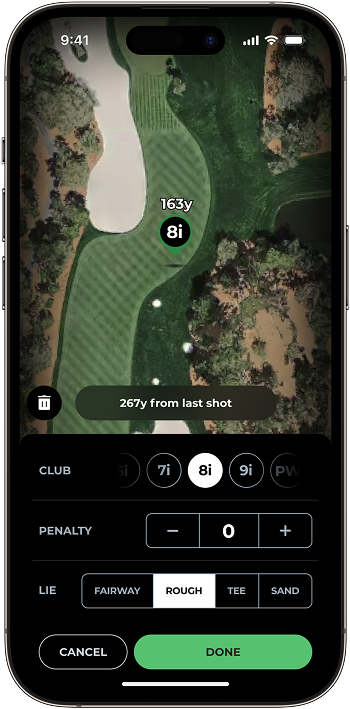
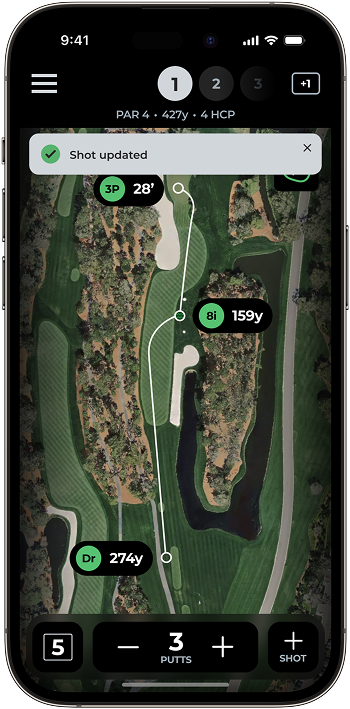
Editing a shot: tap any shot marker on the map and the sheet slides up with inline controls for club, lie, and penalty. Drag the marker to reposition it, tap "done".
We cut the number of taps in half. And critically, you never leave the map. You can see exactly where your shots are while you're editing them.
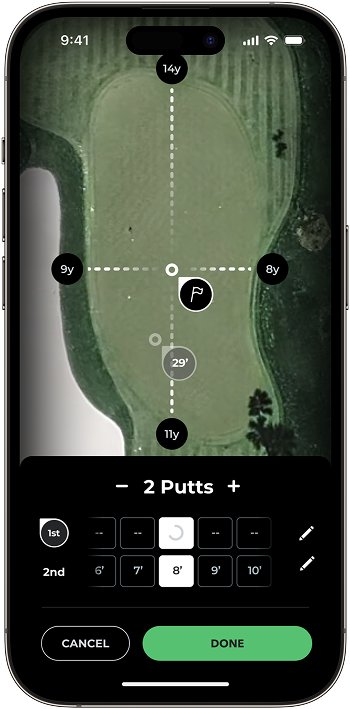
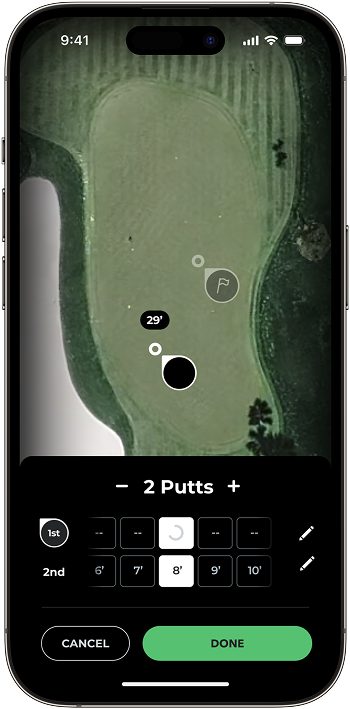
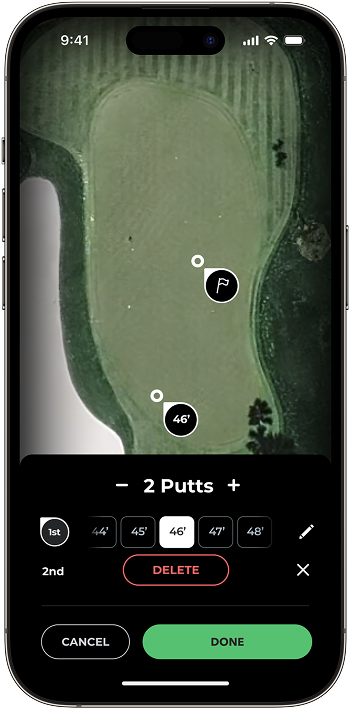
Green view
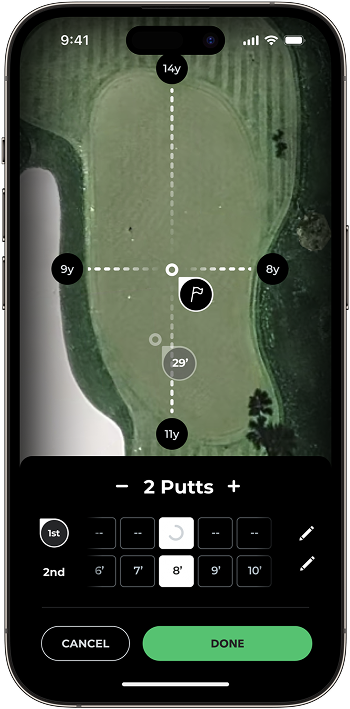
Putting was a persistent data quality gap in the product. The old system couldn't distinguish a chip from a putt, let alone track putt distances. That was a massive blind spot for the analytics, putting accounts for roughly 40% of all strokes in a round of golf.
I designed a dedicated green view: a zoomed-in overhead editor where you tap to place putts on a distance grid. Simple controls set putt count and adjust each putt's position. Combined with new ML models from the engineering team, putting data went from unreliable to accurate enough to power real recommendations.
AI Caddie
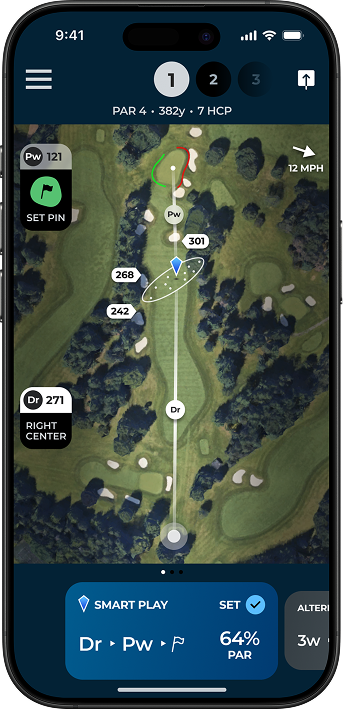
Research showed a clear split in our user base. Casual users wanted simplicity. But a vocal segment of power users, about 30% of our beta group, wanted more strategic depth during their round. The challenge was serving both without the complexity leaking into the default experience.
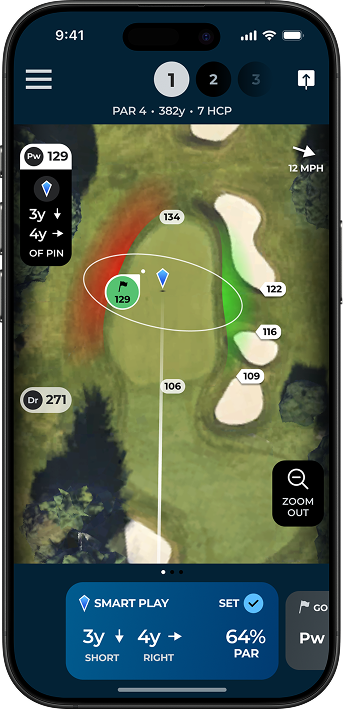
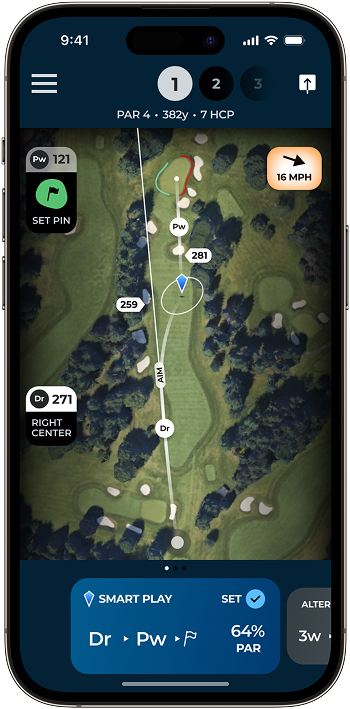
The AI Caddie solves this with a deliberate opt-in pattern. Tap the Caddie button and the UI shifts to a blue color scheme, a clear visual signal that you've entered a different mode. Dispersion circles overlay the map showing where your typical shot pattern lands relative to hazards. A Smart Play recommendation in the sheet shows the optimal club and target line.
You have to actively choose to see this. Everyone else gets a clean, simple map.
Testing on the course
The team took off-site trips to courses in Connecticut and Florida, playing real rounds during the day and iterating in the evenings. We also ran interviews both online and in person at Arccos HQ in Stamford, bringing key members of the Arccos community into the office to get their feedback on the new design directions.
Three findings shaped the final design:
Editing was discoverable
Many testers corrected a mis-detected shot within their first few holes, without any instruction. They tapped the marker, saw the controls, and fixed it- really validating.
The sheet height mattered
Early prototypes had the bottom sheet sitting too high by default, eating into the map. Users kept trying to dismiss it. We dropped the default height and complaints disappeared. Small detail, big difference.
Score confirmation needed a gate
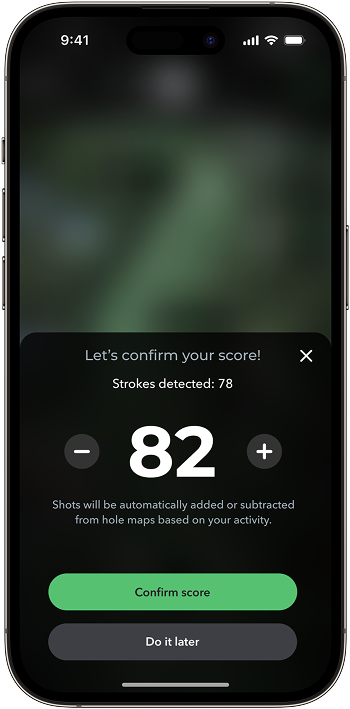
In early testing, users accidentally submitted scores mid-hole by swiping too fast on the sheet. We added a confirmation step for score submission only. It added an extra tap, but the cost of a wrong score was too high to skip it.
Results
Catastrophic rounds cut in half
Rounds flagged as too corrupted to use dropped by more than 50%. The combination of better detection models and fast inline editing meant users were catching and fixing errors before they compounded.
Retention reversed
From the start of the in-play project to a few months after release, retention jumped by over 15 points. A metric that had been declining for over a year was reversing.
User sentiment shifted
Post-update App Store reviews saw a notable shift. The in-play experience went from the most-criticized feature to the most-praised. Several reviewers specifically called out the shot editing and map-first design.
What I learned
Editing is a first-class feature, not a fallback. I initially thought of shot editing as damage control, something users shouldn't have to do. But the research reframed it: when you're dealing with sensor hardware in the real world, imperfect detection is a given. The editing experience isn't a workaround. It's part of the product. Treating it that way changed the way I prioritized it.
Test in context or don't bother. Usability testing in a conference room would have missed every insight about sunlight readability, glove interaction, and the social pressure of holding up your group. Playing actual rounds with the prototype was slower and more expensive than lab testing, but the findings were worth it.
Principles need teeth. We had design principles on previous projects at Arccos, but they were vague enough to justify anything. "Map first, UI second" and "Fix it in 2 taps" were specific enough to actually kill features. When someone proposed adding a weather widget to the main screen, we pointed at "Map first" and the conversation was over quickly.